Tuesday, July 10, 2018
Top 5 FIFA World Cup Songs in 2018
Top 5 FIFA World Cup Songs in 2018
As we covered above there are a total of 5 different songs for this year's World Cup. You might have only heard one of them, so here's a quick breakdown of each song.
#1 - Live It Up (Official)
The official song for the World Cup, as decided by FIFA, is Live It Up featuring some big names that most people will know. Will Smith, Nicky Jam, Era Istrefi, and Diplo, all contributed to this song.
#2 - Komanda
As the World Cup is hosted by Russia, it's only natural that they'd produce a song in their native tongue. Komanda was created by DJ Smash and has been a huge hit this year.
#3 - Colors
For the most recent World Cups, Coca-Cola has released their own anthems as a marketing tactic and 2018 was no exception. Featuring Jason Derulo and others, Colors is worth listening to!
#4 - Positivo
Positivo is a Spanish song that was released by Spanish company Telemundo that features J Balvin, Michael Brun, and Fernando Lugo.
#5 - United by Love
Sung by Natalia Oreiro, United by Love includes lyrics in English, Russian, and Spanish, which has made it popular across all nations.
Download FIFA World Cup Songs for Free
Each of these songs has the potential to be the best World Cup song of all time. Therefore, you might want to consider making one of them your iPhone's ringtone. Download all of your favourite songs (especially those above) using the MP3 Juices download tool, one of the best free music downloaders on the internet.
If you accidentally deleted or lost videos on iPhone, first please check on the Recently Deleted folder. Alternatively, you can use the professional tool Gihosoft iPhone Recovery to recover deleted iPhone videos from Camera Roll or some apps.

Monday, July 9, 2018
iOS 11.4 Beta 3 and below are compatible with Electra jailbreak 2019
HOW IS IOS 11.4 BETA COMPATIBLE WITH ELECTRA JAILBREAK?
Ian Beer’s exploits officially support all iOS 11 versions beginning from iOS 11.2 up till iOS 11.3.1.
However, Apple patched Ian’s kernel exploits only on the final version of iOS 11.4 firmware, thus allowing the exploit to sneak its way into beta versions.
This has given jailbreak developers a golden opportunity to update Electra1131 jailbreak for a signed version.
This development was confirmed by Coolstar in a recent tweet.

CoolStar@coolstarorg
Electra supports iOS 11.4 beta 1 - iOS 11.4 beta 3 as well, if you happened to be on those firmwares!
2:31 AM - Jul 10, 2018
984
394 people are talking about this
In subsequent tweets, Coolstar also confirmed that version 1.0.3 will add support for iOS 11.4 beta 1, beta 2, and beta 3.
Important – Please don’t update your device if it’s already on iOS 11.2-11.3.1. According to Coolstar and Electra Team, staying on a stable firmware is always better. A beta version might lead to complications in the future and
IS APPLE STILL SIGNING IOS 11.4 BETA 3 UPDATE?
If you have an iPhone with an A10 or above processor, you are in luck as Apple is still signing the third beta of iOS 11.4 for these devices. As far as older models go, all devices below iPhone 6s don’t have this update available.
You can download the signed iOS 11.4 beta 3 version for your iPhone below.
iPhone 7
iPhone 7 plus
iPhone 8
iPhone 8 plus
iPhone X
HOW TO DOWNGRADE YOUR DEVICE TO IOS 11.4 BETA 3
Download the appropriate IPSW firmware file for your device using the links above.
Connect your iPhone to your computer.
Launch iTunes.
Press Shift + Update and select the firmware file you downloaded in step 1.
iTunes will now authenticate the firmware file and check its signing status. Since the beta version you downloaded is signed, the downgrade will proceed to the next step.
Wait until the downgrade finishes and your iPhone restarts.
If you haven’t downgraded your device yet, make haste as it won’t be long until Apple stops signing iOS 11.4 Beta 3.
Check out our Facebook and Twitter pages for more round-the-clock jailbreak updates.
Sponsor Ads:
Gihosoft Free iPhone Data Recovery is a professional iPhone Data Recovery software to get back all your lost text message, photo, video, call history, note, contact and more from iPhone/iPad/iPod Touch.
Gihosoft Android data recovery Free is a super awesome software specialized in Android file recovery. With this program, you are able to recover deleted photos, music, videos, messages, contacts, call logs, WhatsApp messages, Viber chat history and more from Samsung, Huawei, LG, HTC, Motorola, Google, Oneplus, Sony, Lenovo, ZTE and other Android devices directly. Meanwhile, this Android data recovery software is available for both Windows and Mac platforms.
Related Articles
Apple releases iOS 11.4.1 (final version)
WHAT’S NEW IN IOS 11.4.1 FINAL UPDATE?
iOS 11.4.1 final version (build number 15G77) comes with two minor bug fixes.
Earlier, users could not view correctly the last known location of their AirPods in Find My iPhone app. This bug will no longer pester users as Find My iPhone now displays the geographical information properly.
Secondly, this update also brings stability improvements for mail sync, contacts, and notes with Exchange Online accounts.
If all goes well with this update, Apple will likely bring the iOS 11 saga to a close and focus on its next major firmware, iOS 12.
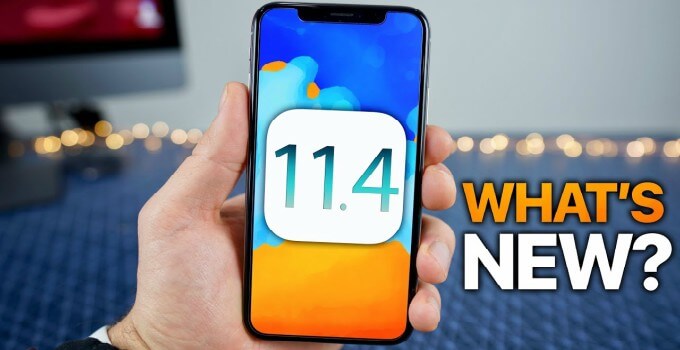
Since this iOS 11.4.1 is a public update, you can install it on your device via OTA update. To initiate an OTA upgrade, go to Settings > General > Software Update and tap Download.
For those of you who want to perform a clean restore or want to update via iTunes, grab the IPSW firmware file below.
DOWNLOAD IOS 11.4.1 FINAL IPSW
IPHONE
iPhone 6s, iPhone 6
iPhone 6s Plus, iPhone 6 Plus
iPhone SE,iPhone 5s GSM, iPhone 5s CDMA
iPhone 8
iPhone 7
iPhone 7 plus
iPhone 8 plus
iPhone X
IPAD
iPad Air 2, iPad mini 4, iPad mini 3
iPad Pro (9.7‑inch)
iPad Air 1, iPad mini 2
IPOD
iPod touch (6th generation)
SHOULD YOU UPDATE?
Yes, you should upgrade your device to iOS 11.4.1 final in case you are affected by the AirPods location bug. For those of you who aren’t affected by this bug, staying on the latest version is always recommended due to security reasons.
As far as jailbreak users are concerned, you should constantly guard your firmware version and prevent Apple from pulling its OTA tricks on you.
Check out our Facebook and Twitter pages for more firmware downloads and updates.
Sponsor Ads:
Gihosoft Free iPhone Data Recovery is a professional iPhone Data Recovery software to get back all your lost text message, photo, video, call history, note, contact and more from iPhone/iPad/iPod Touch.
Gihosoft Android data recovery Free is a super awesome software specialized in Android file recovery. With this program, you are able to recover deleted photos, music, videos, messages, contacts, call logs, WhatsApp messages, Viber chat history and more from Samsung, Huawei, LG, HTC, Motorola, Google, Oneplus, Sony, Lenovo, ZTE and other Android devices directly. Meanwhile, this Android data recovery software is available for both Windows and Mac platforms.
iOS 11.4.1 final version (build number 15G77) comes with two minor bug fixes.
Earlier, users could not view correctly the last known location of their AirPods in Find My iPhone app. This bug will no longer pester users as Find My iPhone now displays the geographical information properly.
Secondly, this update also brings stability improvements for mail sync, contacts, and notes with Exchange Online accounts.
If all goes well with this update, Apple will likely bring the iOS 11 saga to a close and focus on its next major firmware, iOS 12.
Since this iOS 11.4.1 is a public update, you can install it on your device via OTA update. To initiate an OTA upgrade, go to Settings > General > Software Update and tap Download.
For those of you who want to perform a clean restore or want to update via iTunes, grab the IPSW firmware file below.
DOWNLOAD IOS 11.4.1 FINAL IPSW
IPHONE
iPhone 6s, iPhone 6
iPhone 6s Plus, iPhone 6 Plus
iPhone SE,iPhone 5s GSM, iPhone 5s CDMA
iPhone 8
iPhone 7
iPhone 7 plus
iPhone 8 plus
iPhone X
IPAD
iPad Air 2, iPad mini 4, iPad mini 3
iPad Pro (9.7‑inch)
iPad Air 1, iPad mini 2
IPOD
iPod touch (6th generation)
SHOULD YOU UPDATE?
Yes, you should upgrade your device to iOS 11.4.1 final in case you are affected by the AirPods location bug. For those of you who aren’t affected by this bug, staying on the latest version is always recommended due to security reasons.
As far as jailbreak users are concerned, you should constantly guard your firmware version and prevent Apple from pulling its OTA tricks on you.
Check out our Facebook and Twitter pages for more firmware downloads and updates.
Sponsor Ads:
Gihosoft Free iPhone Data Recovery is a professional iPhone Data Recovery software to get back all your lost text message, photo, video, call history, note, contact and more from iPhone/iPad/iPod Touch.
Gihosoft Android data recovery Free is a super awesome software specialized in Android file recovery. With this program, you are able to recover deleted photos, music, videos, messages, contacts, call logs, WhatsApp messages, Viber chat history and more from Samsung, Huawei, LG, HTC, Motorola, Google, Oneplus, Sony, Lenovo, ZTE and other Android devices directly. Meanwhile, this Android data recovery software is available for both Windows and Mac platforms.
Friday, June 15, 2018
How to fix the Wi-Fi problem on iPhone or iPad under iOS 12
How to fix the Wi-Fi problem on iPhone or iPad under iOS 12
When I tried some of the Reliable solutions, one of them managed to solve the WiFi problem on my iOS 12 device. As a result, my run with the latest iOS iteration has returned to the fast track. And you? Facing the same roadblock? Give a chance to the following tips to solve the obstacle.
Check Your W-Fi Router
Sometimes the Wi-Fi router can also be the culprit behind network problems. So, give a new start.
Try turning off your WiFi router, then unplug it from the power source. Now take a cup of coffee and wait about 10 minutes. Then, reconnect it and reconnect it to the power source.
Note: Try to connect to another Wi-Fi network, if it is available to you. If you do not encounter any roadblock using other networks, your WiFi connection will be at fault. Therefore, I suggest you talk to your network provider.
Give a new start to the WiFi network and your device
Give the WiFi Network and Your Device a Fresh Start
Disconnect your device from the Wi-Fi, reboot it and then reconnect to the network.
Step #1. Launch Settings app → Tap on Wi-Fi.

Step #2. Now, you need to tap on the “i” button next to a Wi-Fi network. Now, tap on Forget This Network and confirm.
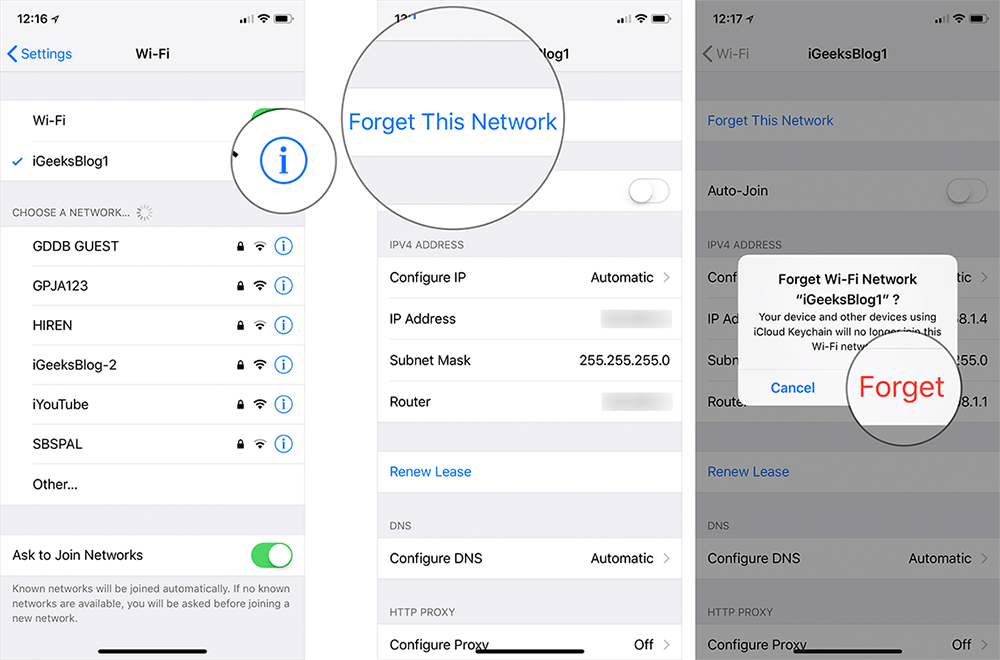
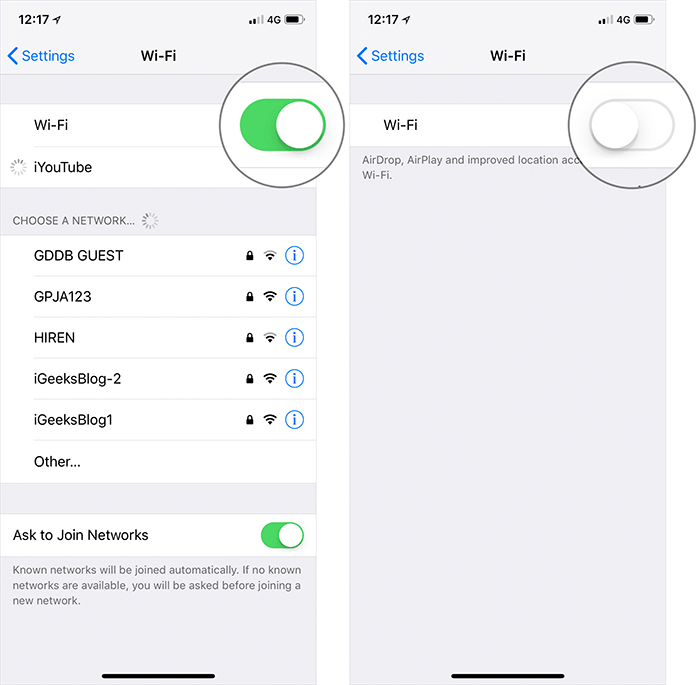
Step #3. Next, turn off Wi-Fi.
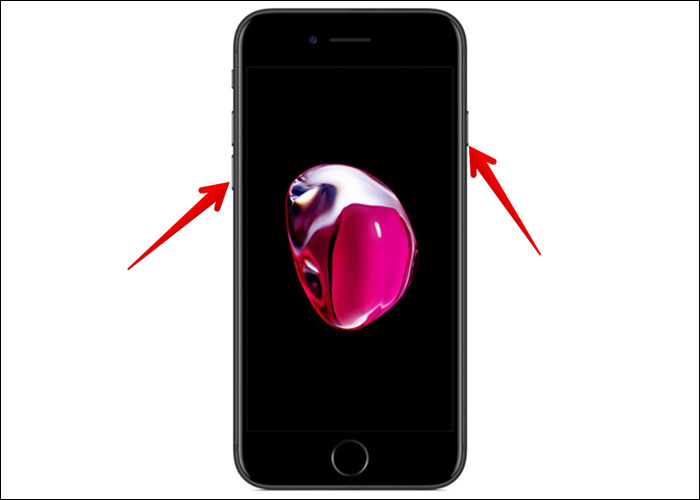
Now, hard reset your device.
To reboot iPhone SE, 6s Plus, 6s or earlier, you need to press and hold home and power ON/OFF buttons at once for about 10 seconds.

To reboot iPhone 7/7 Plus, just press and hold ON/OFF and volume down buttons simultaneously.
To reboot your iPhone X, iPhone 8/8 Plus, press and release volume up button, press and release volume down button. Then, you have to press and hold side button until Apple logo appears.
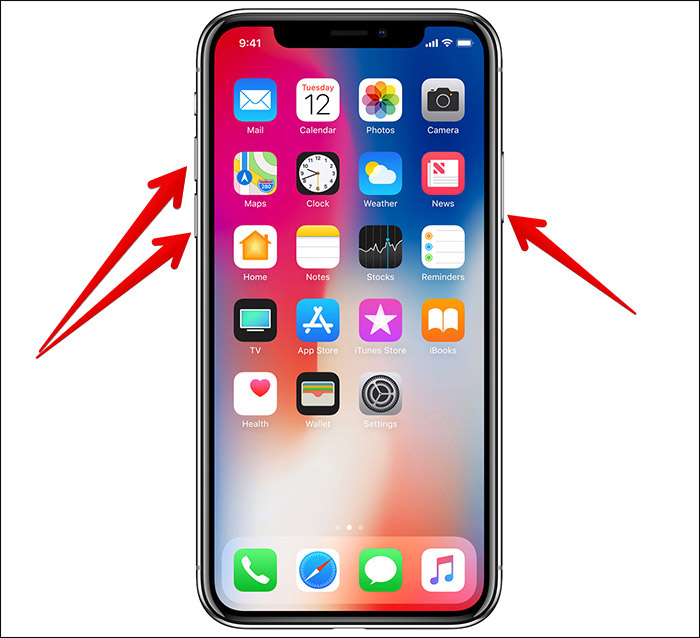
After the device has rebooted, turn on Wi-Fi. Then, connect to the network as usual.
The problem should be fixed now. If you have found the success, wonderful! But if you are still struggling to get over the line, don’t be disappointed. It’s time to go for a bit advanced solutions.
Reset Network Settings
One of the most reliable tricks to shoot out the ill-functioning Wi-Fi on iOS devices has long been resetting the network settings. So, give it a go.
Step #1. Launch Settings app on your device → Go to General.

Step #2. Tap on Reset → Tap on Reset Network Settings.
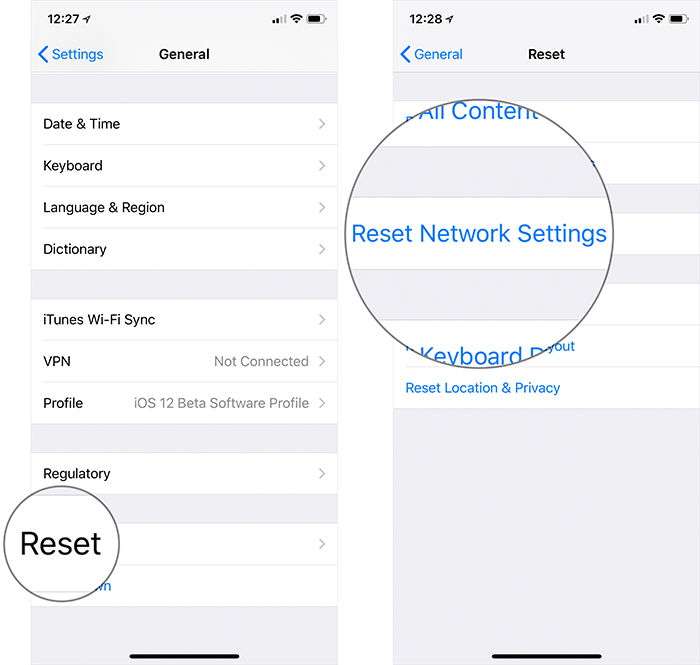
Step #3. Enter your iPhone Passcode and confirm.
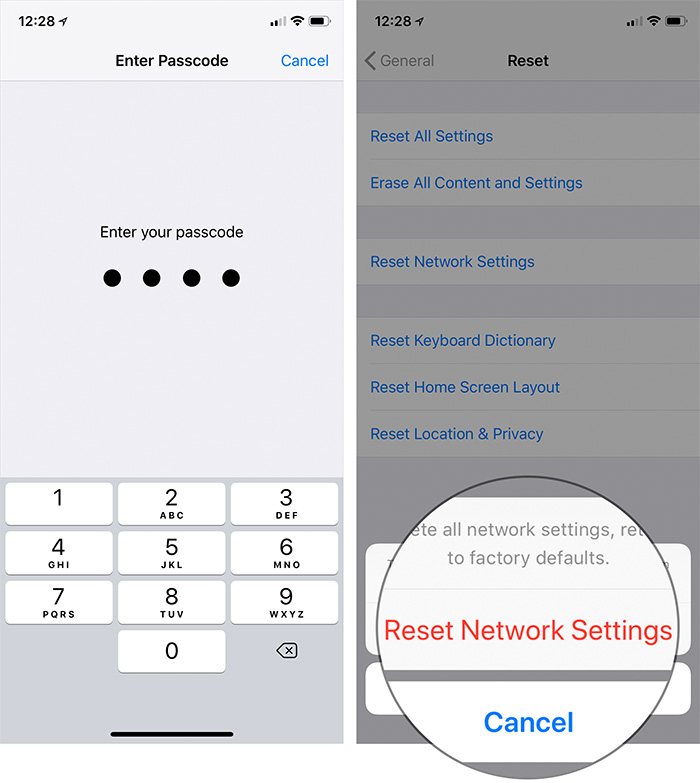
Now, connect to the Wi-Fi. It should be all right. If the problem persists, move on to the next solution.
Turn off Wi-Fi Networking Services
Try turning off Wi-Fi networking services on your device. Once disabled, it stops your location from being used for Wi-Fi networking.
Step #1. Launch Settings app → Tap on Privacy.
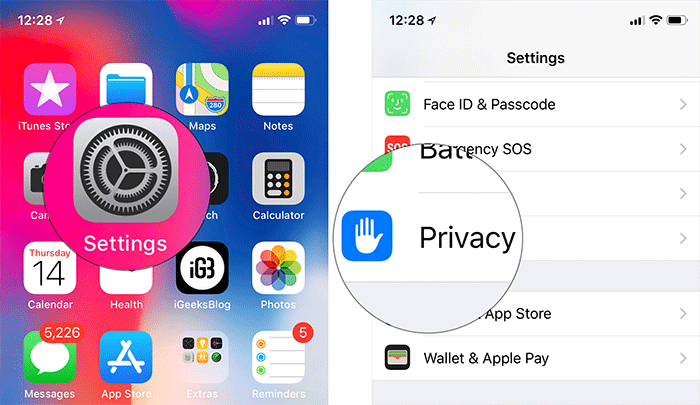
Step #2. Now, you need to tap on Location Services → Go to System Services.

Step #3. Now turn off the switch next to Wi-Fi networking.

Once the problem is resolved and Wi-Fi starts functioning properly, you can turn on this feature. To do so, follow the same steps mentioned above and then toggle on the switch for Wi-Fi networking.
Disable VPN
If you are using VPN, turn it off for awhile to see if it solves the problem. You can turn it off from the Settings app. To find out more about how VPN apps work, jump over to this complete guide.
Set Custom DNS
On a few occasions switching to Google DNS or OpenDNS could has helped me in resolving the Wi-Fi problem on my iPhone. Therefore, I would suggest you to not to leave out this trick. Head over to this guide to change DNS settings on your iOS device.
Downgrade from iOS 12 to iOS 11/Update
If you have come to this far, the bug would be the wrecker-in-chief. Hence, it will be a wise idea to take a backseat at least for now. I mean, go back to iOS 11 from iOS 12.
Don’t want to return to iOS 11? Then, wait for the iOS 12 update and once it’s there, upgrade your device.
Gihosoft iPhone Data Recovery is a professional iPhone Data Recovery software to get back all your lost text message, photo, video, call history, note, contact and more from iPhone/iPad/iPod Touch. It offers a full solution to recover your lost data in different tough situations. Besides recovering data directly from iPhone, iPad and iPod touch, it also allows you to recover data from iCloud and iTunes backup files.
Wrapping up
Let me know which one of the above solutions worked for you in troubleshooting the issue. And yes, if you have found any other way to resolve this problem, do let us know that as well.
Thursday, June 14, 2018
How to Spot if Apple Earpods are Fake or Real
Have you bought an Apple Earpods from any shop or Online? How to know Apple Earpods is Original or Fake?
Well after reading this article, you can easily Distinguish and identify the Original Apple Earpods from the fake one without any confusion.
How to know if Apple Earpods is Original?
Apple Earpods are one of the finest Earpods that you will ever find. The sound quality of the earpiece and microphone are so great that even the expensive earphones in the
market cannot compete with Apple Earpods.
You can buy Apple Earpods anywhere on internet or local store but it is really hard to find
out if the Apple Earpod is fake or real cause they look identical to each other. But after you finish reading this post, you will be able to spot differences between fake and real Apple Earpod easily.
Fake Vs Real Apple Earpod
Packaging
All original Apple Earpods comes with a great packaging like shown in the image below. Some copied Earphone also comes in a packaging like this but they are much lighter than the original ones. If you weigh fake Earpod in one hand and the original Apple Earpod on the other hand, you will know the difference. The original Apple Earpod are heavier than the fake one.

Click of a button
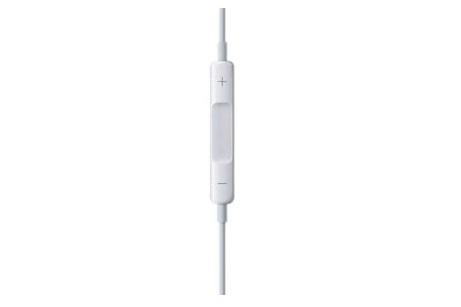
Fake Apple earphones can also be figured out by the click of its remote button. They are much harder while pressing and the click sound can be heard from some meters away while the button present on Apple’s original Earpods are softer and the button click is very light.
Check out small trademark written “Designed by Apple in California” on wire
If you closely look on Apple original Earpods wire, you will notice “Designed by Apple in California” trademark written in very small letters. You will need an eagle’s eye to see it. But the fake Apple Earpods do not have this trademark.

Check the bass hole
The bass hole on Apple’s Earpod are created for a very good reason. It is not there for a
design purpose only. They are there to create a deep bass while listening to songs by letting air flow in and out. Check out why there are holes in Apple’sEarpod here.
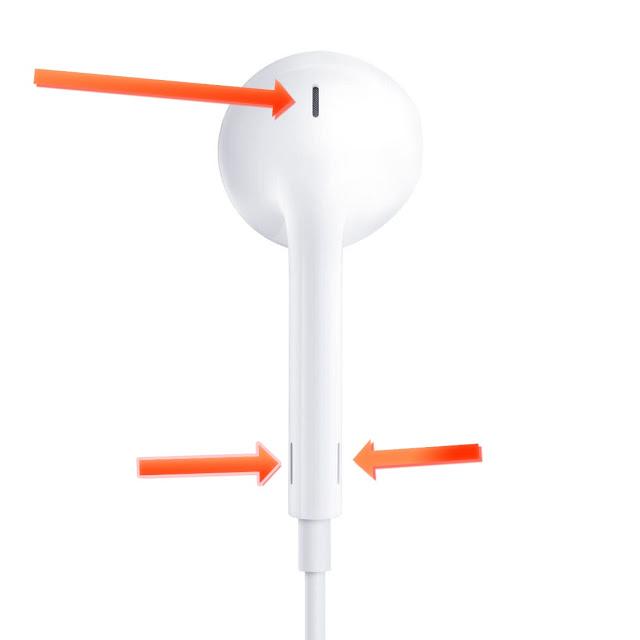
But the bass hole on fake Apple Earpod are empty and are just for dress up purpose to make it look like the original one.
Microphone test
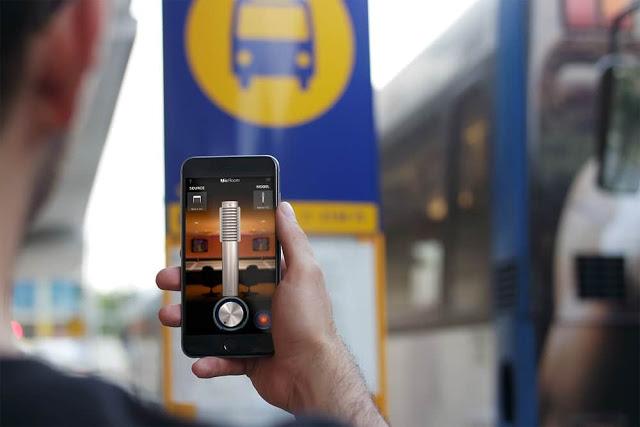
Mic Room is a great app to know the difference between the fake and real Apple Earpod. This app can monitor what you speak in real time. In original Apple Earpod you will be able to hear clear sound like you speak to the condenser microphone while the fake one’s output is more washed out. The microphone quality on fake Apple Earpod is dull and not even close to the original Apple Earpods quality.
Make sure you do check everything that is mentioned here in this post to find out the
duplicate and original Apple Earphone from now on. Always buy genuine.
Let us know what you think about this trick to find out the difference between fake and the
Sponsor Ads:
Gihosoft iPhone Data Recovery is a professional iPhone Data Recovery software to get back all your lost text message, photo, video, call history, note, contact and more from iPhone/iPad/iPod Touch. It offers a full solution to recover your lost data in different tough situations. Besides recovering data directly from iPhone, iPad and iPod touch, it also allows you to recover data from iCloud and iTunes backup files.
original Apple Earphone in the comment section below.
Monday, June 11, 2018
Hacker tool of Instagram account
Hacker tool of Instagram account
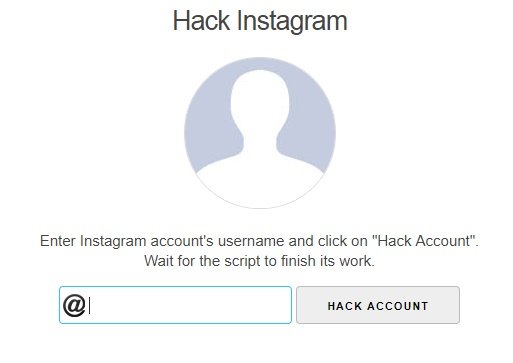
The hacker tool of Instagram account is a very well-known application using which you can come to know how to hack Instagram account. All you have to do is to provide the user ID of the Instagram account that you wish to crack and then wait till the script performs the required action. You can use it very easily, and you are not required to download any third party applications. Moreover, a hacker can keep his identity anonymous throughout the whole process.
Pros
Interface based on web
Does not need any third party tool
The hacker can maintain his or her anonymity
easy to use
Cons
Does not give desired results
Halts in the middle
Users are forced to buy something or complete certain details before doing Instagram password hack.
Part 3: Hacker of Instagram
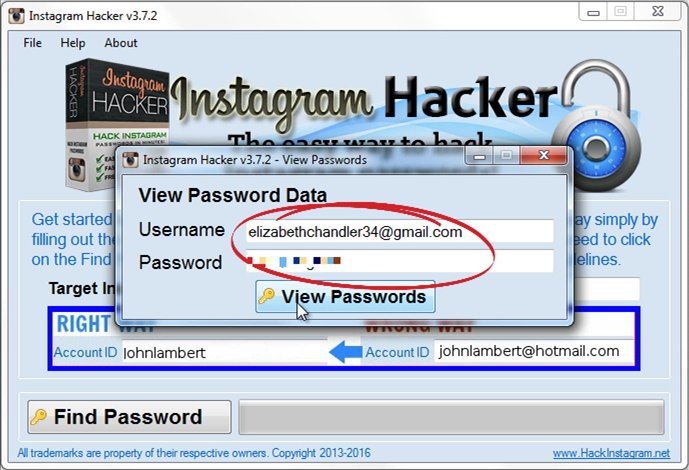
Instagram hacker offers a hassle free and fast manner through which one can crack passwords of Instagram accounts although this tool does not have any specific feature. The hacker of Instagram can work on all the main versions of Windows. One can download this tool from its site for free. Once this tool is launched you need to give the user ID of the account for Instagram password hack. After a few seconds, the account will get hacked, and the cracker of Instagram password will show the password.
Pros
Available for free
Easy to use
Supports the main version of Windows as well as other interfaces
Lightweight app
The algorithm works quickly.
Cons
It downloads malware on the PC sometimes
This tool is incompetent to hack an account of Instagram because of its privacy policy
Part 4: Use Decryptor for Instagram Password Hack
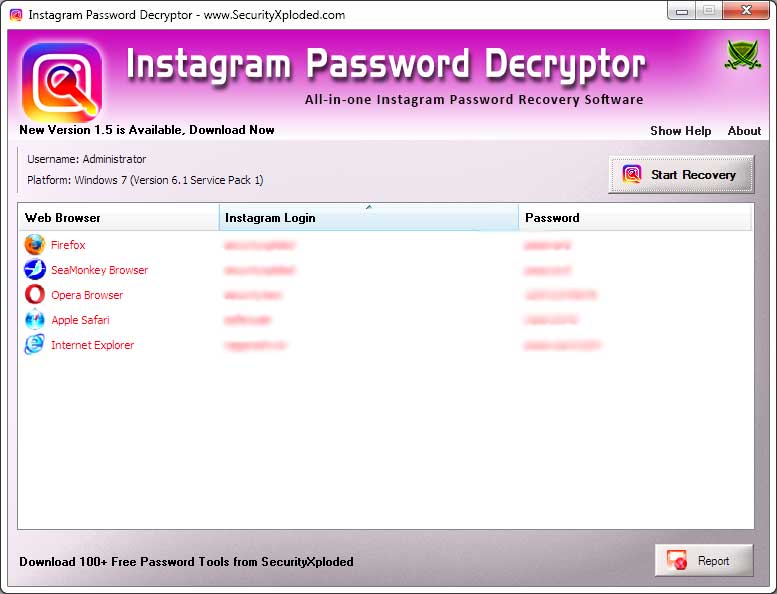
The decryptor of the Instagram password has been designed by Security Xploded. This password finder is a great solution for the users who do not remember the password of their Instagram account. This software decrypts the saved passwords through a browser on a computer system. But this software has a lot of limitations. This tool can only be used for decrypting your own password on Instagram. If you want to know how to hack Instagram account of another Individual, then in such a case you need access to his or her personal computer.
Pros
It is available for free
Its interface is very easy to use
Give secure as well as reliable results
It has an interface of command line
It also has a graphic user interface
Cons
This tool is outdated
It can only decrypt passwords, which are saved on an internet browser
Part 5: Finder of Instagram Password
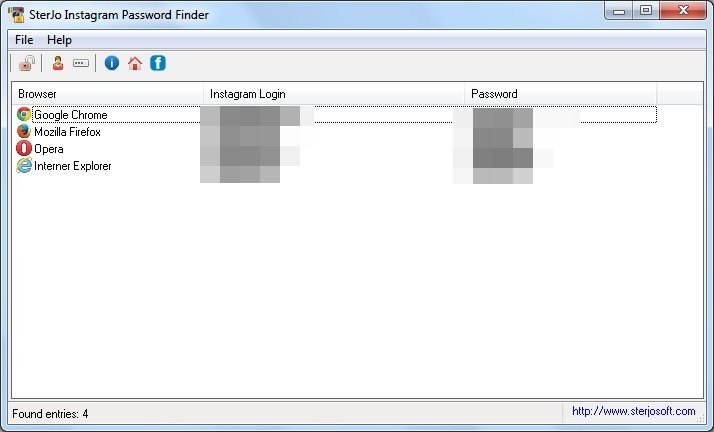
Designed by the Sterjo software, this tool performs the same functions as decryptor of the Instagram password. With the help of this tool, one can retrieve the already saved passwords from an internet browser without going through a lot of trouble.
The finder of Instagram password can be used to decode the password of Instagram through the use of internet browsers such as Internet Explorer, Mozilla Firefox, Safari, and Google Chrome. Just like the Decryptor of the Instagram password, you cannot use this tool to crack the password of another individual.
Pros
Very easy to use
Available for free
Lightweight tool
Supports many languages
Cons
Instagram password of another individual cannot be retrieved through this tool.
You can only use this tool to retrieve the password of an Instagram account that you do not remember.
To Conclude:
So, these were the five different ways through which you can come to know how to hack Instagram account. You can crack the password of Instagram by using the Spyzie software. The best thing about this software is that you can use it to spy on someone and that to be without getting detected. Moreover, you can use this tool to locate a hacked device. You can also use the tool hacker of Instagram account to crack the password of Instagram account of any particular user. This tool is very easy to use. Plus, you don't need to download any third party application if you use this tool.
Another hacker for Instagram password hack is the hacker of Instagram. This tool of hacking is freely available and very easy to use. The algorithm works very quickly on this hacker of Instagram. Moreover, this tool supports the latest versions of all the well-known interfaces.
Do you like this story?
Sponsor Ads:
Gihosoft iPhone Data Recovery is a professional iPhone Data Recovery software to get back all your lost text message, photo, video, call history, note, contact and more from iPhone/iPad/iPod Touch. It offers a full solution to recover your lost data in different tough situations. Besides recovering data directly from iPhone, iPad and iPod touch, it also allows you to recover data from iCloud and iTunes backup files.
The hacker tool of Instagram account is a very well-known application using which you can come to know how to hack Instagram account. All you have to do is to provide the user ID of the Instagram account that you wish to crack and then wait till the script performs the required action. You can use it very easily, and you are not required to download any third party applications. Moreover, a hacker can keep his identity anonymous throughout the whole process.
Pros
Interface based on web
Does not need any third party tool
The hacker can maintain his or her anonymity
easy to use
Cons
Does not give desired results
Halts in the middle
Users are forced to buy something or complete certain details before doing Instagram password hack.
Part 3: Hacker of Instagram
Instagram hacker offers a hassle free and fast manner through which one can crack passwords of Instagram accounts although this tool does not have any specific feature. The hacker of Instagram can work on all the main versions of Windows. One can download this tool from its site for free. Once this tool is launched you need to give the user ID of the account for Instagram password hack. After a few seconds, the account will get hacked, and the cracker of Instagram password will show the password.
Pros
Available for free
Easy to use
Supports the main version of Windows as well as other interfaces
Lightweight app
The algorithm works quickly.
Cons
It downloads malware on the PC sometimes
This tool is incompetent to hack an account of Instagram because of its privacy policy
Part 4: Use Decryptor for Instagram Password Hack
The decryptor of the Instagram password has been designed by Security Xploded. This password finder is a great solution for the users who do not remember the password of their Instagram account. This software decrypts the saved passwords through a browser on a computer system. But this software has a lot of limitations. This tool can only be used for decrypting your own password on Instagram. If you want to know how to hack Instagram account of another Individual, then in such a case you need access to his or her personal computer.
Pros
It is available for free
Its interface is very easy to use
Give secure as well as reliable results
It has an interface of command line
It also has a graphic user interface
Cons
This tool is outdated
It can only decrypt passwords, which are saved on an internet browser
Part 5: Finder of Instagram Password
Designed by the Sterjo software, this tool performs the same functions as decryptor of the Instagram password. With the help of this tool, one can retrieve the already saved passwords from an internet browser without going through a lot of trouble.
The finder of Instagram password can be used to decode the password of Instagram through the use of internet browsers such as Internet Explorer, Mozilla Firefox, Safari, and Google Chrome. Just like the Decryptor of the Instagram password, you cannot use this tool to crack the password of another individual.
Pros
Very easy to use
Available for free
Lightweight tool
Supports many languages
Cons
Instagram password of another individual cannot be retrieved through this tool.
You can only use this tool to retrieve the password of an Instagram account that you do not remember.
To Conclude:
So, these were the five different ways through which you can come to know how to hack Instagram account. You can crack the password of Instagram by using the Spyzie software. The best thing about this software is that you can use it to spy on someone and that to be without getting detected. Moreover, you can use this tool to locate a hacked device. You can also use the tool hacker of Instagram account to crack the password of Instagram account of any particular user. This tool is very easy to use. Plus, you don't need to download any third party application if you use this tool.
Another hacker for Instagram password hack is the hacker of Instagram. This tool of hacking is freely available and very easy to use. The algorithm works very quickly on this hacker of Instagram. Moreover, this tool supports the latest versions of all the well-known interfaces.
Do you like this story?
Sponsor Ads:
Gihosoft iPhone Data Recovery is a professional iPhone Data Recovery software to get back all your lost text message, photo, video, call history, note, contact and more from iPhone/iPad/iPod Touch. It offers a full solution to recover your lost data in different tough situations. Besides recovering data directly from iPhone, iPad and iPod touch, it also allows you to recover data from iCloud and iTunes backup files.
Friday, June 8, 2018
Top Free iCloud Activation Lock Removal Tools 2018
Top Free iCloud Activation Lock Removal Tools
1. iCloud Bypass Tool - iCloudin
This iCloud bypass tool performs effectively and works on all Apple Devices. It is very easy to use and completely free. Users of this tool will attest to its efficiency.

Pros
- It is entirely free to use
- It has a great interface which allows for easy usage
- It has built-in tutorials which help you to master the utilization
- It works on most iOS devices
- It has no in-app purchases or advertisements
Cons
- It has no ratings and therefore there's no definite data on its reputation.
- Its website does not have an admirable interface and this hampers users in searching for it.
Supported Devices
iPhone 6s Plus, iPhone 6s, iPhone 6 Plus, iPhone 6, iPhone 5S , iPhone 5C, iPhone 5, iPhone 4S, iPhone 4, iPad Air, iPad Mini, iPad 4/3, iPad 2
2. Doulci iCloud Unlocking Tool
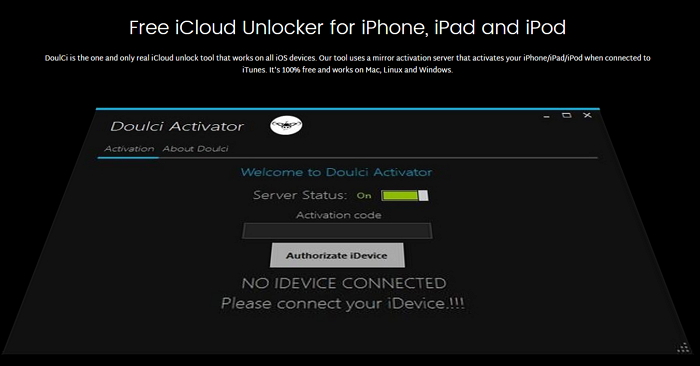
It is one of the most efficient tools for bypassing activation lock, very easy to use and works on all iOS device. It is not a UI tool and thus allows you to run your own iCloud bypass server.
Pros
- It has a 75% success rate in bypassing iCloud activation locks.
- It is entirely free.
- It supports all iOS Devices and iOS Versions.
- It has plenty of tutorials to guide you in the process.
- Extraordinary support is available on the website almost 24/7.
Cons
- You are required to participate in a survey before you can download the application.
Supported Devices
All iPhone models, all iPad models, all iPod touch models
3. iCloud Bypass Tool
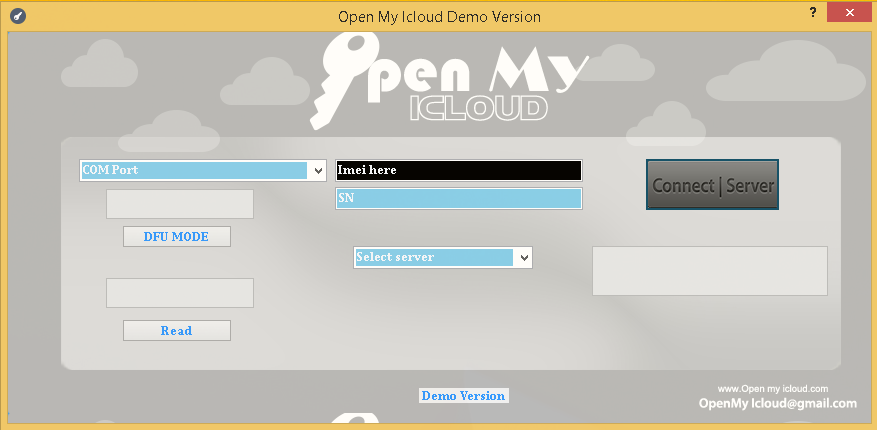
It is one of the most commonly used iCloud Activation lock removal tools and can be used for different purposes such as bypassing iCloud activation, bypassing iCloud lock Pros and even removing an iCloud account.
Pros
- It can perform more than one function.
- It works with almost all iOS devices.
- It is very efficient and easy to navigate.
Cons
- Its download speed is slow.
- Due to its multipurpose functions, response time is greater and it lags.
- It has a relatively low rating of 3.5 stars.
Supported Devices
iPhone 6S Plus, iPhone 6S, iPhone 6 Plus, iPhone 6, iPhone 5S , iPhone 5C, iPhone 5, iPhone 4S, iPhone 4, iPad Air, iPad Mini, iPad 4/3, iPad 2
Gihosoft iPhone Data Recovery is a professional iPhone Data Recovery software to get back all your lost text message, photo, video, call history, note, contact and more from iPhone/iPad/iPod Touch. It offers a full solution to recover your lost data in different tough situations. Besides recovering data directly from iPhone, iPad and iPod touch, it also allows you to recover data from iCloud and iTunes backup files. What's more, it supports Smart Recovery modes that can find your iPhone data quickly.
4. Gadget Wide – iCloud Bypass Tool
This is one of the best tools for bypassing iCloud activation lock. It is user-friendly, compatible with most Apple devices and efficient.

Pros
- It is one of the most highly skilled tools on the market.
- It is completely free to download and use.
- It is highly efficient and easy to use.
- It has preconfigured setting which makes the process relatively easier.
- It has a very fast turnaround time.
Cons
- You have to download the software to your computer in order to use the tool.
- It is less compatible with older devices.
Supported Devices
iPhone 4s, iPhone 4, iPhone 5s, iPhone 5c, iPhone 5, iPhone 6, iPhone 6s, iPhone 6 Plus, iPhone 6s Plus, iPhone 7s Plus, iPhone 7s, iPhone 8, iPhone 8 Plus, iPhone X.
Subscribe to:
Posts (Atom)
Find Your Next Dependable Charging Cord Here [Deals Hub]
There’s no such thing as too many charging cables. Fortunately, these days there are plenty of options when it comes to color and length. We...
-
Top 5 FIFA World Cup Songs in 2018 As we covered above there are a total of 5 different songs for this year's World Cup. You might h...
-
How to Use App Limits and Downtime in iOS 12 to Restrict Excessive Usage of Apps Use App Limits and Downtime in iOS 12 to Restrict Excessi...
-
6 Tricks to Fix YouTube App Crashing in iOS 12 1. Reboot Your iPhone Rebooting your iPhone is simply forcing it to restart. These steps will...

